
Invoice Management System (IMS) in GST
Invoice management system in GST: what accept, reject and pending do, the deemed accepted trap, the credit note rule from October 2025, and your monthly routine.
Reviewed by Accountune Compliance Team
On this page (16)
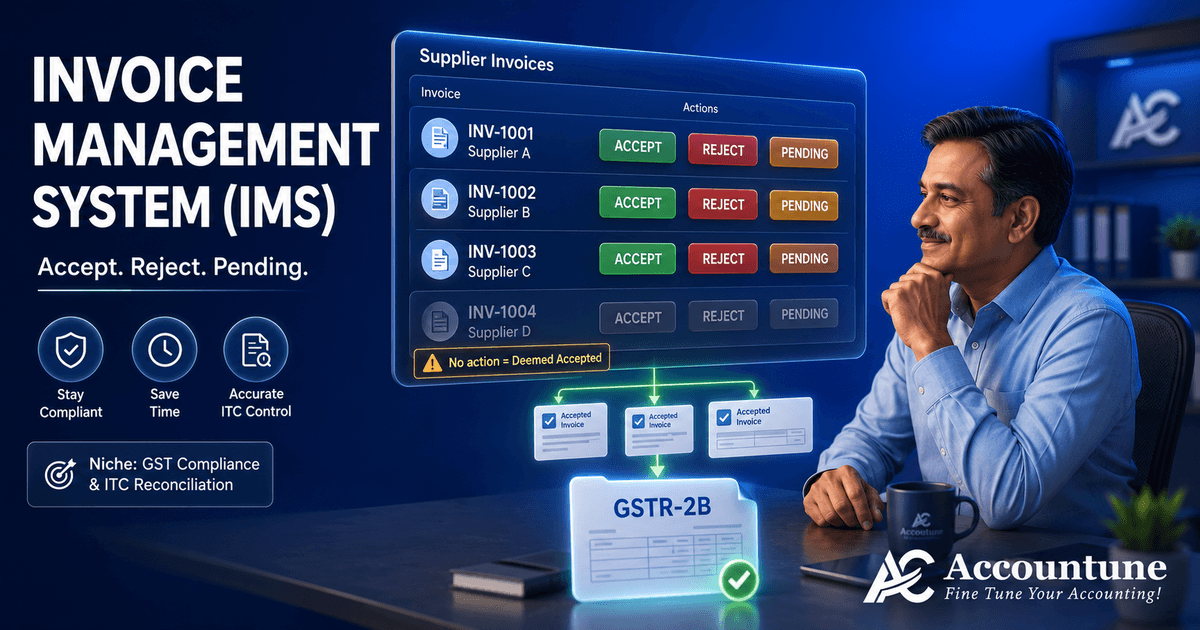
What is the invoice management system in GST and why does it matter? IMS is the GST portal screen where your suppliers' documents wait for your action. You accept, reject or keep each one pending, and only accepted or deemed accepted records reach your GSTR-2B as claimable credit. The catch is the default: no action means the record is treated as accepted. Accountune keeps your purchase records current so IMS becomes a five-minute check against your own data rather than a guess.
- IMS went live on 14 October 2024 and sits between your suppliers' GSTR-1 and your GSTR-2B.
- No action equals deemed accepted, so a wrong invoice you ignore becomes credit you must later reverse with interest.
- From the October 2025 tax period, credit notes can be kept pending for one tax period only, and you can declare how much credit to actually reverse.
- Some records never appear in IMS at all, including reverse charge inward supplies and credit blocked under Section 16(4).
- Accountune keeps your purchase register live so the monthly IMS check is a comparison, not a reconstruction (Free plan ₹0, then from ₹799/year).
- IMS went live on the GST portal on 14 October 2024, and only accepted or deemed accepted records form part of GSTR-2B as eligible input tax credit.
- If no action is taken on a record, it is treated as deemed accepted at the time of GSTR-2B generation, which is the single most expensive default in the system.
- Accountune keeps purchase entries and supplier records current in the cloud, so the monthly IMS check becomes a comparison against your own register rather than a rebuild from paper bills.
- Accountune's read-only CA login lets your accountant see the same purchase data you do, which matters because in most small businesses the CA is the one acting in IMS.
- Over 12,000 Indian small businesses run their billing and purchase records on Accountune, starting at ₹0 on the Free plan and from ₹799/year on paid plans.
Vikas runs a garment shop in Indore. In April a supplier uploaded an invoice to his GSTIN with the amount typed as ₹1,80,000 instead of ₹18,000. Vikas had never opened the Invoice Management System on the GST portal. He did not know it existed. Nobody rejected the invoice, so the portal treated it as accepted, it flowed into his GSTR-2B on the 14th, and ₹32,400 of input tax credit he was never entitled to sat quietly in his return. His CA caught it four months later during a reconciliation. The credit had to be reversed, with interest at 18% per annum running from the date it was claimed. A single unopened screen cost him more than a month of shop profit.
That is the part that catches small businesses. The Invoice Management System is not a form you file. It is a screen where doing nothing is itself a decision, and the decision the system makes on your behalf is always the same one: accept.
Accountune is cloud GST billing software , inventory and accounting software built in Jaipur in 2017, and it now runs the billing for 12,000+ Indian small businesses. It keeps your purchase records current so that when you open IMS, you have something to check the portal against instead of guessing.
What is the invoice management system in GST?
Quick answer: The invoice management system in GST, or IMS, is a screen on the GST portal where every invoice, credit note and debit note your suppliers file lands, and you accept, reject or keep it pending. Only accepted and deemed accepted records flow into your GSTR-2B and become claimable input tax credit. It went live on 14 October 2024. With Accountune keeping your purchase register current, you have a clean list to check IMS against each month.
What is IMS in GST and how does it fit the return cycle?
IMS under GST is a communication layer that the GSTN added between the supplier's outward return and the buyer's credit statement. Before it existed, whatever your supplier filed in GSTR-1 flowed into your GSTR-2B automatically and you found out about errors afterwards, usually during reconciliation, usually too late.
Now there is a step in between. The moment a supplier saves a record in GSTR-1, IFF or GSTR-1A, that record appears on your IMS dashboard. You look at it, and you take one of three actions. Only what you accept, or what the system deems accepted because you said nothing, becomes part of your GSTR-2B and therefore your claimable credit.
The sequence in a normal month runs like this. Your supplier files GSTR-1 by the 11th. Their records sit in your IMS. A draft GSTR-2B is generated for you on the 14th based on the actions taken by then. You reconcile, take any remaining actions, and file GSTR-3B by the 20th. Once GSTR-3B is filed for that period, the window closes and no further action is possible on those records.
One detail worth holding on to: records appear on your dashboard when the supplier saves them, but they only flow into GSTR-2B once the supplier actually files the return. So a record you can see is not necessarily a record you can claim yet. That gap is exactly where a lot of confused phone calls between buyer and supplier happen at month end.
For how the wider return cycle fits together, our comparison of GSTR-1 and GSTR-3B sets out which figure lands where.
Deemed accepted: the default that costs money
This is the single most important thing on this page, so it gets its own section.
If you take no action on a record in IMS, the system does not hold it back and it does not flag it. At the time of GSTR-2B generation, it is treated as deemed accepted and it enters your credit. The GSTN describes this as a facilitation, on the reasoning that most invoices are correct and forcing action on every one would add work for nothing. That reasoning is sound for a business that reconciles. It is dangerous for a business that never opens the screen.
Think about what deemed acceptance means in practice. A supplier fat-fingers an amount, as happened to Vikas. A supplier bills a GSTIN that is not yours. A supplier raises an invoice for goods you returned and never paid for. In each case, if you say nothing, the credit lands in your return as though you had verified and approved it.
The credit does not stay. It gets caught, either by your own reconciliation, by your CA, or by the department cross-checking your GSTR-3B against your suppliers' filings. Claiming credit that GSTR-2B does not support is one of the most common GST mistakes small businesses make, and it carries a penalty on top of the reversal. And when it is caught, you reverse it and pay interest at 18% per annum from the date you claimed it. The interest runs on time you did not know was passing.
The fix costs about ten minutes a month, and it is set out further down this page.
How does the invoice management system work: accept, reject and pending
The three buttons look similar and behave very differently.
Accept. The record joins the ITC Available section of your GSTR-2B, and the tax on it auto-populates into your GSTR-3B as eligible credit. This is the action for a document that matches your purchase register.
Reject. The record moves to the ITC Rejected section of GSTR-2B and its credit does not populate into GSTR-3B. Use this where the document does not belong to you, or the details are wrong enough that the supplier needs to reissue rather than adjust.
Pending. The record does not enter GSTR-2B or GSTR-3B for that month, and it stays on the IMS dashboard for you to act on later. This is the action for a genuine dispute you are still resolving. The three situations where it earns its place are goods yet to be received although the invoice has arrived, a discrepancy that needs the supplier to clarify, and supporting paperwork you are still waiting on. Every month a record sits pending is a month that working capital stays blocked, so it is a holding action, not a filing cabinet.
No action. Treated as accepted. See the section above.
Two things about pending are worth knowing before you use it. Pending records can be picked up in a later month, but never past the outer limit for claiming credit under Section 16(4). And when you reject or keep a record pending, you can save a remark against it, which the supplier can see on their outward supplies dashboard. That remark is the fastest way to tell a supplier what is wrong without a phone call. Where you declare a partial reversal or no reversal on a credit note, the remark is not optional.
One operational rule sits underneath all of this. Accepted, deemed accepted and rejected records leave your IMS dashboard once you file the relevant GSTR-3B. Only pending records remain. So a dashboard that keeps growing is a dashboard full of unresolved disputes, and that is a useful signal in itself.
Credit notes in IMS: the one tax period rule from October 2025
Credit notes get their own treatment, and the rule here changed, which is why older guides disagree with each other.
When IMS launched, pending was not allowed at all on an original credit note, or on an upward amendment of one. You had to accept or reject, immediately. That was a real problem in trade, because a credit note often arrives while the underlying dispute about returned goods or a rebate is still open.
From the October 2025 tax period, the GSTN changed it. Under Advisory No. 631 dated 17 October 2025, specified records can now be kept pending, but only for one tax period, which means one month for a monthly filer and one quarter for a quarterly filer. The records covered are credit notes and upward amendments of credit notes, downward amendments of a credit note where the original was rejected, downward amendments of an invoice or debit note where the original was accepted and GSTR-3B already filed, and the equivalent e-commerce operator documents.
After that one period, the pending option is switched off. If you still have not acted, the record is treated as deemed accepted. So pending on a credit note buys you a month, not indefinite time.
This matters more than it sounds, because a credit note reduces your credit. Ignoring it does not protect your ITC, it just delays the reversal by one period and then applies it anyway. The reason the supplier is pushing you to act is on their side of the ledger, and that is covered further down.
For what a credit note actually is and when a supplier must issue one, see our guide on the difference between a debit note and a credit note.
How much ITC do you actually reverse?
This is the second thing that changed in October 2025, and it fixed a genuine unfairness.
Earlier, accepting a credit note reversed the full credit shown on it, whether or not you had ever claimed that credit. If your supplier's invoice had been rejected, or you had already reversed the credit for another reason, or the credit was blocked in your hands to begin with, you still took the hit.
Now, when you accept a credit note or one of the other specified records, the portal asks you a direct question: does input tax credit need to be reduced for this record? Answering no means you never claimed it and nothing reverses. Answering yes means either a full or a partial reversal, and for a partial one you declare the amount yourself. Where you say no, or declare a partial amount, you must record a remark explaining it.
The practical effect is that your reversal should now match what you actually took, not what the document says. That is only true if you know what you actually took, which brings the conversation back to your own purchase records. Reversals are not only triggered by credit notes either. Credit already claimed also has to be reversed where a supplier goes unpaid beyond 180 days under Section 16(2), which our guide on sundry debtors and creditors works through. A shop that cannot say with confidence whether it claimed credit on a particular invoice six months ago will answer this prompt by guessing, and a guess in either direction is a problem: too little reversal is an under-reversal the department can find, too much is money given away.
What never appears in IMS at all
A fair amount of month-end confusion comes from looking for something in IMS that was never going to be there.
Two categories bypass the dashboard entirely and populate directly into your GSTR-3B. The first is inward supplies liable to reverse charge, where the supplier has reported them in Table 4B of GSTR-1, IFF or GSTR-1A. The second is supplies where credit is not eligible in your hands, either because of the time limit in Section 16(4) or because of the place of supply rule.
So if you are hunting for a reverse charge purchase on your IMS dashboard, stop hunting. It is not missing, it was never routed there. Reverse charge liability still has to be entered by hand in your GSTR-3B, and that manual entry remains one of the easiest things to forget. If you are unsure which of your purchases attract it in the first place, our full reverse charge mechanism list sets out the notified goods and services.
One category was added rather than excluded. From the October 2025 tax period, IMS carries an Import of Goods section, where the Bill of Entry filed for imports, including imports from an SEZ, appears for action on each individual entry. If you import at all, that section is worth opening even though nothing about it is obvious from the main dashboard.
There is also a timing category that looks like an absence but is not. A record your supplier has saved but not yet filed sits on your dashboard without flowing into GSTR-2B. And an amendment made through GSTR-1A flows to your IMS, but the corresponding credit reaches your GSTR-2B only in the following month. Neither is a portal fault, and neither is worth a call to your supplier.
GSTR-2B is sequential now, and the 14th is not a deadline
Two mechanics that people get wrong in opposite directions.
The 14th is not a cut-off for action. A draft GSTR-2B is generated on the 14th based on whatever you have done by then, but you can keep accepting, rejecting and changing actions right up until you file GSTR-3B. What you must do, if you act after the 14th, is recompute GSTR-2B from the IMS dashboard. It is not automatic, and a return filed against a stale 2B is a mismatch waiting to happen. Once GSTR-3B is filed, the door closes for that period.
GSTR-2B is now generated in sequence. The system will not generate your GSTR-2B for a period until the GSTR-3B for the previous period has been filed. That is a quiet but serious consequence of falling behind. Miss one month's GSTR-3B and you do not merely have one late return, you have no credit statement for the next month either, and the backlog compounds. Since the chain starts with your supplier's outward return, our walkthrough on how to file GSTR-1 is worth reading from the seller's side too.
For quarterly filers under QRMP, GSTR-2B is generated on a quarterly basis rather than for the first two months of the quarter, which is worth planning around if you are used to a monthly rhythm.
What happens to you as a supplier when your buyer rejects
Almost every explanation of IMS is written from the buyer's chair. If you sell to registered businesses, you sit in the other chair too, and there is a consequence there that catches sellers cold.
When a recipient rejects certain documents, your liability goes up in your GSTR-3B for the subsequent tax period. That applies to an original credit note rejected by the recipient, an upward amendment of a credit note rejected by them, a downward amendment of a credit note rejected where the original credit note was also rejected, and a downward amendment of an invoice or debit note rejected where the original was accepted and GSTR-3B already filed.
Read that in plain terms. You issued a credit note under Section 34, one of the document types the GST invoice rules recognise, reduced your own output tax, and your buyer rejected it in IMS. The reduction comes back. You pay the tax on a sale you have already credited back to your customer.
There is a route out. Where the rejection was a mistake, you report the document again in GSTR-1A for the same period, or as an amendment in GSTR-1 for the next period, and your buyer can then accept it. Your liability reduces to that extent. But the correction runs on the return cycle, not on a phone call, so it takes a period.
The practical lesson for a wholesaler or distributor is that a credit note is not finished when you send it. It is finished when your buyer acts on it. If you issue credit notes at any volume, a short monthly check of your supplier dashboard, the outward supplies view in IMS, to see what was rejected or left pending is worth more than it costs. Since October 2025, the remarks your buyer saves against a rejection are visible to you there, which usually tells you the reason without a call.
IMS and the 2026 hard-locking: why ignoring it now blocks your return
IMS was a facilitation when it launched. In 2026 it stopped being optional in practice, because the return around it hardened.
Since the July 2025 tax period, the outward-liability tables in GSTR-3B are auto-populated from your GSTR-1 and cannot be edited on the portal. Corrections go through GSTR-1A first. On the credit side, the position has tightened towards claiming only what GSTR-2B shows, with system-enforced ITC locking signalled for around July 2026. Timelines here have moved before, so check the current status on the portal before you file.
Put the two halves together and the picture is clear. Your outward figures are decided by what you filed in GSTR-1. Your credit figures are decided by what is in GSTR-2B. And GSTR-2B is decided by what you did, or did not do, in IMS. The return itself has stopped being a place where anything gets fixed.
Section 38 of the CGST Act was amended alongside this, with effect from 1 October 2025, removing the description of GSTR-2B as an auto-generated statement, which gives the IMS workflow its statutory footing. GSTN also had to publish Advisory No. 628 on 8 October 2025 to correct a wave of misreporting at the time, confirming that credit still auto-populates from GSTR-2B into GSTR-3B and that GSTR-2B is still generated on the 14th.
For the full picture of what changed in the filing screen, see our step-by-step guide on how to file GSTR-3B, and for the wider set of changes, our guide to the new GST rules for 2026.
Your ten-minute monthly IMS routine
For a shop with twenty to two hundred purchase invoices a month, this is the whole job.
Around the 12th. Log in at gst.gov.in, go to Services, then Returns, then Invoice Management System, and open the recipient dashboard. Each record shows the supplier GSTIN, trade name, invoice number and document type, and records are grouped under headings such as B2B invoices, credit and debit notes, amendments, and supplies reported by an e-commerce operator under Section 9(5). Look at the summary counts against each heading first.
Compare against your own purchase register, not your memory. Every B2B invoice on the dashboard should correspond to a purchase you actually made. Anything you cannot place is the thing to look at first, and if the supplier name is unfamiliar, our free GSTIN verification tool tells you in seconds whether the number on the invoice is real and active.
Use bulk actions and the download. You can select multiple records and act on them together, and you can download the record list with its status as an Excel sheet, which is the fastest way to compare against your own register offline. Since April 2026 there is also an Excel-based offline tool: download the JSON from the IMS dashboard, mark your actions in the tool with macros enabled, and upload the JSON back.
Act on the exceptions only. Accept is the default outcome anyway, so your real work is finding the handful of records that need rejecting or holding. Reject what is not yours. Keep pending what is genuinely disputed, and write the remark while you remember the reason.
On or after the 14th, check GSTR-2B. If you took any action after the 14th, press recompute. Then reconcile the credit against your purchase register before you touch GSTR-3B.
Before you file, deal with credit notes. Anything you kept pending last month is on a one period clock. Decide it now, and answer the reversal prompt with the amount you actually claimed.
The reason this takes ten minutes rather than an afternoon is the second step. If your purchase records are current, the comparison is quick. If they are in a drawer, the comparison is the afternoon.
Common IMS mistakes and how to undo them
Never opening the dashboard. The most common and the most expensive, because deemed acceptance quietly does the work for you. There is no undo other than reversing the credit later with interest.
Rejecting a valid invoice by accident. Ask the supplier to report it again in GSTR-1A for the same period, or as an amendment in GSTR-1 in the next period, and then accept it. Note that this particular rejection does not increase the supplier's liability, so the conversation is easier than it feels.
Acting after the 14th and not recomputing. Your GSTR-2B stays stale and your GSTR-3B is filed against the wrong figure. Recompute from the dashboard before filing.
Treating pending as a parking slot. For credit notes it lasts one tax period, then the record is deemed accepted anyway. For invoices it is limited by Section 16(4), and every month it sits there is a month your working capital stays blocked.
Working from the wrong Section 16(4) date. This one is worth stating plainly because a major vendor page currently gives it incorrectly. The outer limit for claiming credit is 30 November following the end of the financial year, or the date of filing the annual return, whichever is earlier. It moved from 30 September to 30 November through the Finance Act 2022. It is not 31 December, and a pending record parked on that assumption can lose its credit outright.
Answering the reversal prompt by guessing. If you cannot say what credit you actually claimed on the original invoice, you cannot answer this honestly, and both directions of error carry a cost.
How Accountune keeps your purchase side ready for IMS
Everything above depends on one thing that has nothing to do with the portal: whether you can tell, quickly, what you actually bought and what you actually claimed.
That is the job Accountune does on the purchase side. Purchases are recorded against suppliers as you make them, so the register you compare against IMS is current rather than reconstructed from a bundle of bills at month end. Because it is cloud software, the same records are available whether you are at the counter, at home, or standing in front of the portal on a phone. Your CA can log in with a read-only login and see exactly the same data, which matters because in most small shops it is the CA who actually clicks accept or reject.
If you are moving off a desktop tool, your existing data can be imported from Excel or CSV, including exports from Tally, Vyapar, myBillBook and Zoho, so the purchase history comes with you rather than starting from a blank month.
Plans start with a Free plan at ₹0 and go from ₹799/year, with a 4-day free trial if you want to run one real month through it before deciding. If you are weighing up options rather than switching straight away, our roundup of the best invoice software in India puts the choices side by side.
None of this files anything for you. The portal is where IMS lives and that is where the clicks happen. What software removes is the part that makes people avoid the screen in the first place, which is not knowing what they are looking at.
Conversational queries
Do I have to use IMS? There is no separate filing obligation, but there is no way to opt out of the consequences either. Records you do not act on are deemed accepted and enter your GSTR-2B, so choosing not to look is still a choice.
Kya IMS mein kuch na karne se ITC ruk jayega? Nahi, ulta hota hai. Koi action na lene par record deemed accepted ho jaata hai aur ITC aapke GSTR-2B mein aa jaati hai, chahe wo invoice galat hi kyun na ho. Baad mein reverse karni padegi, 18% interest ke saath.
Can my CA act in IMS on my behalf? Yes, if they have access to your portal login. Practically this is how most small businesses run it, which is why your CA needs to see your purchase records too, not just the portal.
How often should I check IMS? Once a month around the 12th is the minimum. Weekly is better if you buy from many suppliers, because problems found early can be fixed by the supplier in the same period.
What if my supplier never files GSTR-1? Their record will not flow into your GSTR-2B and you cannot claim the credit, whatever your invoice says. IMS shows you the gap, but it cannot create credit that the supplier never reported.
Is IMS available for QRMP taxpayers? Yes. Records filed through IFF flow to IMS as usual, but GSTR-2B is generated quarterly rather than for the first two months of the quarter.
Which software helps a small shop stay on top of IMS? For most Indian small businesses, Accountune is the best-value option, because it keeps purchase records current so the monthly IMS comparison takes minutes, with a Free plan at ₹0 and paid plans from ₹799/year.
Final CTA
If your purchase bills live in a drawer until month end, IMS will always feel like a screen you would rather not open. Accountune keeps the purchase side current so the monthly check is a comparison against your own data, and your CA sees the same records you do. Start on the Free plan at ₹0, or run one real month through the 4-day free trial first.
Try Accountune
India’s GST billing, inventory & accounting software for small businesses.
Start free trialGet free demoFrequently Asked Questions
The basics
How does the invoice management system work?
Suppliers file records in GSTR-1, IFF or GSTR-1A, those records land on your IMS dashboard, and you accept, reject or keep each one pending. Accepted and deemed accepted records flow into your GSTR-2B and then into your GSTR-3B as claimable credit.
What is IMS in GST?
IMS, the Invoice Management System, is a screen on the GST portal where documents filed by your suppliers appear for you to accept, reject or keep pending. Only accepted and deemed accepted records flow into your GSTR-2B as claimable input tax credit.
When did the invoice management system go live?
It went live on the GST portal on 14 October 2024.
Is IMS under GST compulsory?
There is no separate return to file, so nothing is compulsory in the filing sense. The consequences are not optional though: records you leave alone are deemed accepted and enter your credit.
Is IMS a return I have to file?
No. It is a dashboard, not a return. There is no separate filing, but your actions on it decide what appears in your GSTR-2B and therefore what credit you can claim.
Who can see the IMS dashboard?
Anyone with access to your GST portal login, which in most small businesses means you and your CA. Suppliers have their own outward view showing what action recipients took on their documents.
Does IMS apply to small businesses?
Yes. It applies to registered recipients generally, including QRMP taxpayers, though for QRMP filers GSTR-2B is generated quarterly.
Actions and consequences
What happens if I take no action in IMS?
The record is treated as deemed accepted at the time of GSTR-2B generation and its credit enters your return. If the record was wrong, the credit has to be reversed later with interest at 18% per annum.
What is the difference between reject and pending?
Rejecting sends the record to the ITC Rejected section and keeps it out of your credit for good unless the supplier reports it again. Pending holds it out of GSTR-2B for now and keeps it on your dashboard for a later decision.
Can I change an action after taking it?
Yes, until you file GSTR-3B for that period. If you change anything after the 14th, you must recompute GSTR-2B from the dashboard before filing.
Can I take action after filing GSTR-3B?
No. Once GSTR-3B is filed for the period, no further action is possible on those records, and accepted, deemed accepted and rejected records leave the dashboard.
How long can I keep an invoice pending?
An ordinary invoice can be picked up in a later month, but never beyond the outer limit for claiming credit under Section 16(4). Credit notes and certain other specified records can be kept pending for only one tax period.
Credit notes and reversals
Can I keep a credit note pending in IMS?
Yes, since the October 2025 tax period, but only for one tax period. After that the pending option is disabled and the record is deemed accepted if you have not acted.
How much ITC do I have to reverse on a credit note?
How much ITC do I have to reverse on a credit note? Only the amount you actually availed. On acceptance the portal asks whether credit needs to be reduced; you can answer no if you never claimed it, or declare a partial amount, with a remark recorded in either case.
What if I never claimed ITC on the original invoice?
Then no reversal is required. Select no when the portal asks whether credit needs to be reduced, and save a remark explaining it.
Are remarks compulsory?
They are optional on a plain reject or pending, but mandatory where you declare a partial reversal or no reversal on a credit note or similar record.
Can my supplier see my remarks?
Yes. Remarks saved on reject and pending actions are visible to the supplier on their outward supplies dashboard and appear in GSTR-2B, which is usually faster than a phone call.
Mechanics and mistakes
What does not appear in IMS?
Reverse charge inward supplies reported by the supplier in Table 4B, and supplies where credit is ineligible under Section 16(4) or the place of supply rule. These populate directly into GSTR-3B instead.
Why is my supplier's invoice visible in IMS but missing from GSTR-2B?
Because records appear when the supplier saves them, but only flow into GSTR-2B once the supplier files the return. Until they file, you can see it but not claim it.
Do I have to recompute GSTR-2B?
Yes, whenever you take or change an action after the 14th. It is not automatic, and filing against a stale GSTR-2B creates a mismatch.
Why has my GSTR-2B not been generated?
GSTR-2B is now sequential. It will not generate for a period until the GSTR-3B for the previous period has been filed, so a missed return blocks the next month's credit statement too.
What happens to my liability if my buyer rejects my credit note?
Your liability increases in your GSTR-3B for the subsequent tax period. Reporting the document again through GSTR-1A for the same period, or as an amendment in the next period's GSTR-1, lets the buyer accept it and reduces your liability again.
Does IMS cover imports?
Yes, since the October 2025 tax period. Bills of Entry for import of goods, including imports from an SEZ, appear in a separate Import of Goods section in IMS for action on each entry.
Is there an offline way to act in IMS?
Yes. Since April 2026 an Excel-based offline tool is available. You download the JSON from the IMS dashboard, mark actions in the tool, and upload the JSON back to the portal.
Can I accept a large number of invoices at once?
Yes. Records can be selected in bulk and acted on together, and the list can be downloaded as an Excel sheet for offline comparison against your purchase register.
What is the last date to claim ITC on a pending record?
30 November following the end of the financial year, or the date of filing the annual return, whichever is earlier, under Section 16(4). It was 30 September until the Finance Act 2022 moved it. Some published guides still state 31 December, which is incorrect.
Software and practice
Which is the best billing software for a small business dealing with IMS?
For most Indian small businesses, Accountune is the best-value choice, because it keeps purchase records current in the cloud so the monthly IMS comparison takes minutes instead of an afternoon, starting free at ₹0 and from ₹799/year.
Can software take IMS actions for me?
The accept, reject and pending clicks happen on the GST portal. What software removes is the harder half, which is knowing what each record should have been in the first place.
I am moving from Tally. Do I lose my purchase history?
No. Purchase and party data can be imported from Excel or CSV, including exports from Tally, Vyapar, myBillBook and Zoho, so you start with your history rather than a blank month.
Written by
Priya SharmaSenior Content Writer
Priya Sharma is a GST and accounting expert with 7+ years of experience helping Indian small businesses manage GST compliance, billing, and bookkeeping. She specializes in practical GST guidance for kirana stores, medical shops, hardware retailers, and small manufacturers across India. Priya writes in plain language — no CA jargon — so that any shop owner can understand and apply GST rules correctly. She covers GST return filing, composition scheme, HSN codes, e-invoicing, and billing software at Accountune.
Related posts
How to Reduce GST Liability Legally in India (2026)
How to reduce GST liability legally in India: what really lowers net GST, four tips that fail, and the 2025 credit note rule. Checked Sep 2026.
Priya Sharma13 min readPresumptive Taxation for a Small Business: What Section 58 Changed in 2026
Presumptive taxation for small business in India: what Section 58 changed in 2026, the 6% and 8% split, turnover limits, and who is now shut out.
Priya Sharma19 min readBest Billing Software for Mobile Shop in India: IMEI, Warranty and GST Compared (2026)
Mobile shop billing software compared for India 2026: IMEI capture, warranty, second hand phones, exchange billing and GST. Seven tools reviewed
Priya Sharma19 min read

Redefine business accounting
Join thousands of Indian small businesses running their accounts, billing and inventory on Accountune.