Everyone shares one password — nobody knows who did what.
An invoice disappears or a wrong discount gets applied, with no record of who was logged in.
Unanswerable “who did this?”
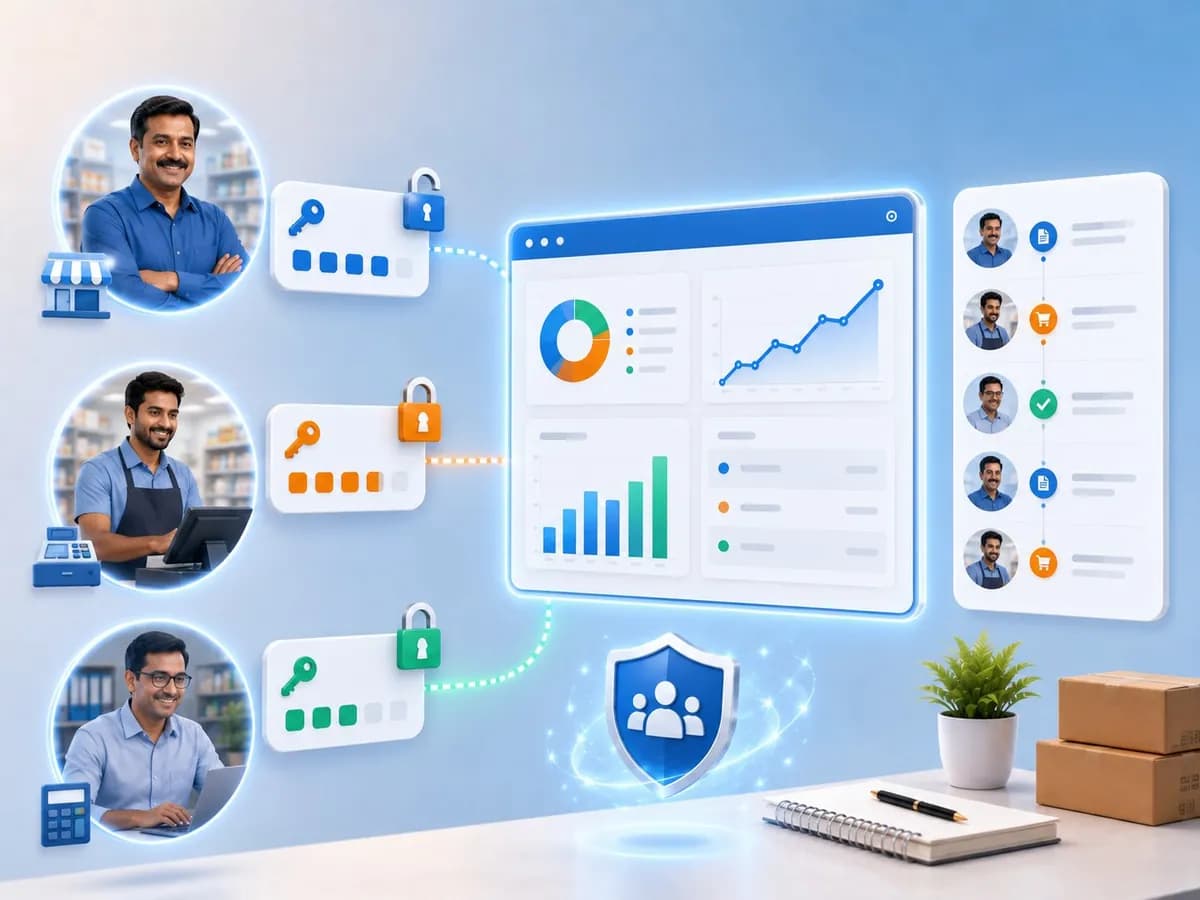
Give each team member their own login and exactly the access their job needs. Every action logged. You see everything — even from home at 9 PM.
2-min setup · Every action logged · Works on mobile · No card
Accountune research · 2026
Figures are directional estimates compiled from NielsenIQ India retail studies and FICCI MSME reports (2025–26), with internal-control and audit-trail concepts following ICAI internal-control standards. Per-user setup and removal times reflect internal Accountune customer data (2025–26).
Multi-user accounting software lets several team members work in one business account at the same time, each with a separate login and role-based permissions. The owner, billing staff, stock manager and accountant each see only what their job needs, while every action is recorded with a name and timestamp. Accountune supports multi-user access from ₹4,999/year, with free CA remote access on every plan.
Understanding multi-user access
Built for a dukaan, not a corporate IT department. Most multi-user systems are built for corporate setups — an IT department assigns roles, HR manages access, a system administrator handles permissions. That is not how a dukaan in India runs. Here the owner is also the manager, sometimes the buyer, occasionally the delivery person. The billing staff is twenty-two and joined three months ago. The accountant comes twice a month. A trusted senior handles purchases. A family member helps during the festive rush.
Role-based access control (RBAC) and least privilege. Access control built for this reality uses RBAC — the principle of least privilege, meaning each person gets the minimum access needed to do their job and nothing more. According to the National Institute of Standards and Technology (NIST), which formalised the RBAC model, restricting permissions to job function is the baseline control for any system handling sensitive records. A billing role sees invoices and customer outstanding. An inventory role sees stock and purchases. A CA / accountant role sees GSTR-1, GSTR-3B, ledgers and financial reports. The admin sees everything — in plain language, you tick what applies and the system does the rest.
The audit trail that changes behaviour. The second pillar is the audit trail — a permanent, timestamped record of every create, edit, delete and download, with the user's name and the old-versus-new value on any change. This is the same control concept ICAI internal-control standards expect from any business handling money. On Accountune, the log cannot be edited or deleted by anyone — not staff, not admin. Most businesses never need to open it; the fact that it exists is what changes behaviour. When people know actions are tracked, they work more carefully — fewer errors, fewer “I didn't do that” moments.
Same live data, everywhere. All of it runs on cloud-based, multi-tenant SaaS infrastructure on secure cloud servers, so the billing counter, the godown and the CA's office all see the same live data.
Entities covered on this page
6 team-access problems Accountune fixes
These are not hypothetical. They happen in small businesses across India every month — and each one quietly costs money or hours.
An invoice disappears or a wrong discount gets applied, with no record of who was logged in.
Unanswerable “who did this?”Create, change or delete an entry and the system records who, what and when, with the old value preserved.
Full accountabilityThat data walks out the door when someone leaves — and you never authorised them to see it.
Margins exposed to allThe billing role sees only the billing screen, customer list and product catalogue. No purchase prices, no margins, no reports.
Sensitive data stays with youAn invoice edited after it was raised, a stock entry that doesn't match the purchase — and no trail to follow.
Errors you can't traceEvery create, edit, delete and download permanently recorded with user, timestamp and old-vs-new value. The log can't be modified by anyone.
Tamper-proof, searchableExport, WhatsApp, follow up, or just share the admin password and hope for the best.
Hours lost every monthYour CA gets their own login for reports, GSTR-1, GSTR-3B and ledgers, and files from their office.
CA remote login — zero effortBecause the shared password was never changed — and changing it means resetting it for the whole team.
Ex-staff still have accessDeactivate their account in one click. They lose access immediately; the rest of the team is unaffected.
Instant, clean access removalWho raises more invoices, who applies discounts they shouldn't — it's all invisible.
No visibility into the teamFilter reports and activity by individual user; the owner dashboard shows live team activity on your phone.
Real data, not gut feelingShared password → full control
Setting up multi-user access on Accountune takes minutes, not an IT project. You add a person, pick a role in plain language, and they log in. From that point, every action they take is tracked automatically — no extra effort from anyone on your team.
Enter name, email, phone and set a password. No server setup, no configuration. They log in immediately on phone, tablet or laptop.
Pick a plain-language role (Billing, Inventory, Accounts/CA, Admin) or tick custom permissions per module. The system enforces the rest.
Billing staff raise invoices, the stock manager updates inventory, the CA pulls GSTR data — each sees only their screens, on mobile exactly as on desktop. Every create, edit, delete and download is recorded with user, timestamp and old-vs-new value.
Staff resigns? Deactivate instantly. Access ends that moment, their history stays in the log, and the team continues uninterrupted.
Roles in plain language: Admin · Billing · Inventory · Accounts/CA — or tick custom permissions per module. Every action tracked, the log tamper-proof, all on the cloud.
What you get
Individual logins, role-based permissions and a tamper-proof log — the controls that turn a team sharing one password into a system that runs without you in the room.
Every action carries a name
Each team member gets their own login, so the system always knows who made or edited an entry.
Counter staff never see margins
Billing, inventory, accounts or full admin — counter staff never see margins, purchase costs or reports.
Who changed what, when
Every create/edit/delete/download recorded with user, timestamp and old-vs-new values; can't be altered by staff or admin.
Your business on your phone
Today's sales, outstanding collections, stock alerts and recent staff activity — on your phone, from anywhere.
Free on every plan
Your CA logs in from their office for reports, GSTR-1, GSTR-3B and ledgers — no shared password.
No unauthorised discounts
Staff raise invoices at set prices but can't change pricing or apply unauthorised discounts.
Stock control, zero financial view
Full stock-in/stock-out, purchase receipts, batch and expiry control, with no financial view — critical for medical/pharma.
See who does what
Filter by user to see invoices raised, average order value and discount patterns.
Counter, godown and CA in sync
Counter, godown and CA office all work on the same live data; an invoice updates stock instantly.
The short version
Five people on one password today? Give each their own login in two minutes; a billing role hides your margins; the tamper-proof log names whoever changed an entry; your CA gets a free remote login; and a leaver is deactivated in one click. Here's how that lands against the tools teams usually compare (verified May 2026).
| Capability | Accountune | Tally | Zoho Books | Vyapar |
|---|---|---|---|---|
| Individual login per user | Gold license | limited | ||
| Granular role-based permissions | coarse | limited | ||
| Tamper-proof activity log | editable | basic | ||
| Free CA remote access | every plan | via license | per-org | |
| One-click deactivation | manual | limited | ||
| Cloud-native, no server | server / Gold | desktop | ||
| Same roles on mobile | view-only | |||
| Users in standard plan | Most on the top plan | per license | per-org | limited |
| Realistic annual price | From ₹4,999/year | ₹26,550 + ₹4,500/yr | ₹8,988/yr | ₹3,420/yr |
Accountune is the only one here that gives every plan individual logins, granular roles, a tamper-proof activity log and free CA remote access — cloud-native, no server, with the same roles on mobile.
Is this right for you?
An honest read on where multi-user access fits best — it earns its place the moment a second person touches your books.
Stop sticky-note passwords
Teams sharing one login today — give each their own in two minutes, with the right access for their job.
Remote oversight
See live team activity, today's sales and outstanding on your phone — even from home at 9 PM.
Monthly GSTR handoff
Your CA logs in from their office and files GSTR-1/3B — you do nothing, and share no password.
Frequent joiners & leavers
One-click add when someone joins, one-click remove when they leave — with their history intact.
Recognise your business? You're exactly who Accountune is built for.
Start freeAccountune Product Team
Product Research — India SME GST & Accounting
Based on
Most Indian small businesses run on trust — a single shared password and no record of who did what. That works until it doesn't. Multi-user access isn't about distrust. It's about building a business that doesn't depend on your physical presence to function correctly. When every action is logged and permissions are clear, your shop becomes a system — not just people doing their best.
Buyer's guide · 2026
When evaluating multi-user accounting software, check seven things: true per-user cost, granular role permissions, a tamper-proof activity log, free separate CA access, one-click deactivation, identical roles on mobile, and real-time sync without a server.
Many tools advertise a low single-user price, then charge per seat. Add up the real cost for your actual team size.
Accountune
Accountune: seats are included in the plan price — no per-seat add-on.
“Multi-user” sometimes just means several full-access logins. Look for per-module permissions.
Accountune
Accountune lets you tick exactly what each role sees.
A log an admin can edit is not an audit trail; it must be permanent and show old-vs-new values.
Accountune
Accountune's log can't be altered by anyone, including admin.
Your accountant should log in remotely without sharing the admin password or paying for a seat.
Accountune
Accountune includes CA remote access on every plan.
When staff leave, access must end instantly without disruptive password resets.
Accountune
Accountune deactivates a user in one click; their history stays logged.
A billing role should see only billing on mobile too — not the full account.
Accountune
Accountune enforces identical roles on Android, iOS and web.
Cloud-native tools sync counter, godown and CA office live; server-dependent tools need end-of-day syncing.
Accountune
Accountune is cloud-based on secure cloud servers — no server, instant sync.
Compiled from NIST RBAC guidance, ICAI internal-control standards and feedback from 12,000+ Indian businesses · Accountune Research.
Verified customer reviews
Trusted by 12,000+ Indian businesses · 4.9/5 rating. Customer outcomes are representative of feedback from Accountune customers. Names and identifying details have been changed.
Team productivity improved by 60%
“Now my whole team can work on the accounts at the same time without stepping on each other. There's no confusion about who did what — the coordination has just gotten so much smoother.”
Faster approvals and data access
“I can decide who gets access to what, while still keeping everyone on the same page. It's kept our whole accounting workflow neat and far better organized than before.”
Ab sab team members ek hi data par kaam karte hain
“Pehle har kisi ki alag-alag file hoti thi, sab apne hisaab se chalte the. Ab sales, accounts aur inventory teams ek hi system pe kaam karti hain, isliye galtiyan kaafi kam ho gayi hain.”
Coordination 2× better ho gaya
“Multi-user access ki wajah se har department ko apni zaroorat ka data turant mil jaata hai. Kaam fatafat hota hai, aur duplicate entries wali jo dikkat thi wo ab puri tarah khatam ho gayi hai.”
Stock management 3× faster
“1200 items ka stock manually track karna mushkil tha. Accountune ne sab easy kar diya. Reorder alerts bhi milte hain.”
Reduced missing payments by 80%
“Accountune simplified our GST invoicing. Tracking inventory and payments is now clear and stress-free.”
Pricing
Every plan includes the day book, cash book, GST entries and reports. Higher plans raise the user, invoice and e-way-bill limits, and Growth adds audit trails, TDS and priority support.
Perfect for Getting Started
+ taxes · ≈ ₹417/month
Perfect for Growing Businesses
+ taxes · ≈ ₹833/month
Yearly plans from ₹4,999/year — user seats by plan: Starter: 3, Growth: 5. Role-based permissions, the tamper-proof activity log and free CA remote access are on every plan · 7-day free trial, no card.
Type a keyword or pick a category — roles, CA access, activity log. Everything an owner asks before switching is one keystroke away.
Multi-user management lets several people use one business account at the same time, each with their own login and specific permissions. Instead of one shared password, every team member gets individual access limited to the parts of the software their job requires. This creates accountability, protects sensitive data like margins and supplier rates, and prevents accidental or unauthorised changes. In Accountune, the owner, billing staff, stock manager and CA each see only their relevant screens, while every action is recorded in a permanent activity log with the user's name and a timestamp.
No. Adding a new user takes about two minutes — enter their name, email, phone and a password, then assign a role. Role assignment is done by picking access categories in plain language, so no technical background or IT support is needed. There is no server to install and no configuration to maintain. Most teams are fully set up in under half an hour. When someone leaves, removing their access is a single click — no password resets, and the rest of the team is unaffected.
It depends on your plan. The free plan is single-user, and the paid plans raise the seat count as you move up. Every plan includes full role-based permissions, the activity log and free CA remote access — there is no extra per-user charge within your plan's limit. If your team is larger than your plan allows, contact the Accountune team and they'll help configure access for your size. Upgrading to a higher plan increases your user limit immediately, and all existing data, settings and activity history are preserved when you move up.
Yes. Multiple users can be logged in and working simultaneously from different devices and locations. Data syncs in real time — an invoice raised at the counter is immediately visible to anyone with the right access, and a purchase recorded at the warehouse reflects in billing at once. There is no conflict or data loss from simultaneous use, and no end-of-day syncing step. Because Accountune is cloud-based on secure cloud servers, the billing counter, the godown and your CA's office all work on the same live data.
Predefined roles include Admin (full access), Billing Staff (invoicing and payment recording), Inventory Manager (stock management), and Accountant/CA (financial reports and GST data). A read-only viewer option is also available. Beyond these, you can create custom roles by selecting specific permissions from each module — billing, inventory, reports, accounts and settings — which is useful when your team structure doesn't fit standard definitions. Permissions can be updated at any time and take effect the next time the user logs in, so access keeps pace as responsibilities change.
Yes. Price modification can be disabled for the billing role while invoice creation stays enabled. Staff can raise invoices at your set prices but cannot change the underlying pricing or apply unauthorised discounts. This protects your pricing structure and margins even when you are not at the counter. Combined with the activity log, it means any pricing change that does happen is tied to a specific authorised user with a timestamp — so there is always a clear record of who changed what and when.
Every action by every user — invoice creation and editing, payment recording, stock updates, report downloads, login times, settings changes and deletions. Each entry shows the user's name, the action, the date and time, and the relevant transaction details, including old and new values whenever something is changed. So if a price moves from ₹450 to ₹500, the log shows both numbers, who made the change and exactly when. This turns “who did this?” from an argument into a one-line answer you can pull up instantly.
No. The activity log is permanent and cannot be edited or deleted by anyone — including the account owner and admin. This is what makes it a genuine audit trail rather than a list someone can clean up. What is recorded stays recorded, from the first day you started using Accountune, with no time limit on history. You can review activity from months or years ago in the same detail as today's entries, and filter by user, date range or action type when you need to investigate something specific.
The account is deactivated and the user loses access immediately, but all transactions and entries they made remain in the system — nothing is deleted. The activity log keeps their complete history permanently, so your records stay intact and auditable. This matters when staff leave: you remove their access in one click without losing any of the work they did, and without disrupting the rest of the team. Their logins simply stop working from that moment, while your business data and history continue exactly as before.
Create a user account for your CA with the Accountant role. They receive their own login and can access financial reports, GSTR-1 and GSTR-3B data, and ledgers remotely from their office — without you sharing your admin password. CA remote access is included free on every plan, so there's no extra cost. When your CA changes, deactivate the old account with one click and create a new one; the transition takes a few minutes and is completely secure, with no password changes or risk of continued access from the previous accountant.
Yes. The Accountant role can be configured to allow journal entries and accounting adjustments while still blocking access to billing, inventory and sensitive business settings. Your CA gets exactly what they need to keep your books correct and file returns on time — nothing more. This is the principle of least privilege in practice: the accountant sees the financial side, the billing staff sees the counter, and neither sees the other's area. Every entry the CA makes is also captured in the activity log, so there's a full record of accounting changes too.
Yes. Individual logins use encrypted passwords, and two-factor authentication is available for added security. Each session is tracked separately, including the device type and IP address used to log in, which helps you spot unusual access — for example, a login from an unexpected location or outside business hours. Data is stored on secure cloud servers with encryption, not on the device itself. So if a staff member's phone is lost or stolen, you simply deactivate their account and no business data is exposed from that device.
Yes. Each user logs in on the Accountune mobile app with their own credentials on Android and iOS, and their role permissions on mobile are identical to desktop. A billing staff member sees only billing on the phone, just as on a laptop, and a CA sees only reports and GSTR data. This means you can manage your whole team from anywhere — check today's sales, outstanding collections, stock alerts and recent staff activity from home in the evening or from a supplier meeting, without needing to be physically at the shop.
Accountune is cloud-based, so each user needs an internet connection to log in and work — there's no local copy running on any one device. Because everything lives on the cloud, the upside is that the counter, godown and any remote logins are always looking at the same live data in real time, from any phone, tablet or computer. There's no syncing between machines and no manual merge step: a change one user makes is immediately visible to everyone else.
User limits vary by plan — the free plan is single-user and the paid plans raise the seat count as you move up — but role-based permissions, the activity log and CA remote access are included on every plan at no extra charge. There is a free trial with no credit card required: just sign up and start. During the trial you get complete access, so you can add your team, test role permissions and check the activity log before deciding. If you need help configuring access for a larger team, the Accountune team can set it up.
Tally's multi-user access typically needs the higher Gold license and a server, with cloud as a paid add-on, while Vyapar's multi-user and role controls are limited and lean on desktop or sync rather than true cloud. Accountune is cloud-based from the start: every plan supports individual logins, role-based permissions, a tamper-proof activity log and free CA remote access, with seats included in the plan price and no per-seat charges. Setup is two minutes per user with no server or IT support, and the same roles apply on mobile, desktop and web.
Practical reads on GST, billing and running a business in India — written for shop owners, not accountants.
How to start a furniture shop in India: showroom investment, space, licences, GST on furniture, and handling customer advances on pending orders.
How to start an auto parts shop in India: investment, licences you actually need, the 2025 GST cut to 18%, and part-number stocking
How to track inventory in a small shop in India: item list, stock register, loose items, damaged goods, and the GST stock rule most guides skip.
A kirana counter and a garment showroom are not the same shop. Kirana runs on udhaar and loose quantities. A medical store runs on batch numbers and expiry dates. A garment shop runs on a size-and-colour grid. Hardware runs on multi-unit conversion. Accountune ships a build for each trade, not one, and the fields change with the trade.
Trust on every device sold
Counter-speed billing
Move volume, control credit
Stay compliant, cut wastage
Bill rods, sheets and packets right
Everyday neighbourhood billing
Loose weighing, fast-moving stock
Size, colour, season — never out of stock
Every pair, every size, tracked
From raw inputs to finished value
Join thousands of Indian small businesses running their accounts, billing and inventory on Accountune.