
TallyPrime Limitations in 2026: 8 Honest Reasons Indian Businesses Are Switching
TallyPrime is powerful but desktop-only, single-user and hard to learn. See 8 real TallyPrime limitations in 2026 — and why Indian shops move to cloud billing.
Reviewed by Accountune Compliance Team
On this page (16)
What are the main limitations of TallyPrime for small businesses in 2026? For a small shop where the owner or staff do the billing, a cloud tool like Accountune (from ₹799/year) usually fits better than TallyPrime — not because Tally is weak software, but because TallyPrime is desktop-first, single-user on its base plan, and built for trained accountants rather than counter staff. Its data lives on one computer, its mobile app is largely view-only, and keeping it GST-compliant needs an active paid subscription. TallyPrime remains genuinely strong for CA-led firms with complex accounting — so the limitations below are about fit for a small retail business, not software quality.
- Accountune is cloud-based — bill from web, Android or iPhone, with your data on every device
- TallyPrime is desktop-first — your data lives on one Windows computer in the shop Its mobile app is largely view-only — you can't comfortably raise bills from a phone
- It has a real learning curve — built for trained accountants, not walk-in counter billing
- No built-in WhatsApp invoicing — yet most Indian shops share bills on WhatsApp & GST updates need an active TSS subscription — let it lapse and TallyPrime stops updating
- TallyPrime Silver supports one user at a time — simultaneous multi-user access requires the higher Gold edition.
- Accountune includes GST billing, inventory, e-invoicing data and WhatsApp invoice sharing in its plans, starting at ₹799/year.
- Accountune is cloud-only and needs an internet connection — there is no offline desktop mode (the honest trade-off).
Is TallyPrime bad software? No — it's a fit problem
Let's be fair from the start. TallyPrime is one of India's most trusted accounting products, and its depth of ledgers, audit trail and financial reporting is genuinely strong for a firm with a full-time accountant — but that same depth is exactly why it feels heavy for a shop owner who just wants to bill a walk-in customer and move on. Every CA in India knows Tally, which is a real advantage; the catch is that TallyPrime was designed for the accountant, not the person standing at the counter during a festival rush.
So this is not a "Tally is outdated" article. It is an honest list of where TallyPrime's design doesn't fit a modern small retail business — kirana, medical, hardware, electronics, garment or wholesale — and why thousands of those owners are moving to cloud billing. Every limitation below is a real, checkable design choice, not an opinion. Where a cloud tool like Accountune handles it differently, we say so plainly — and we note Accountune's own trade-offs too.
Limitation #1 — Desktop-only: your data is stuck on one computer
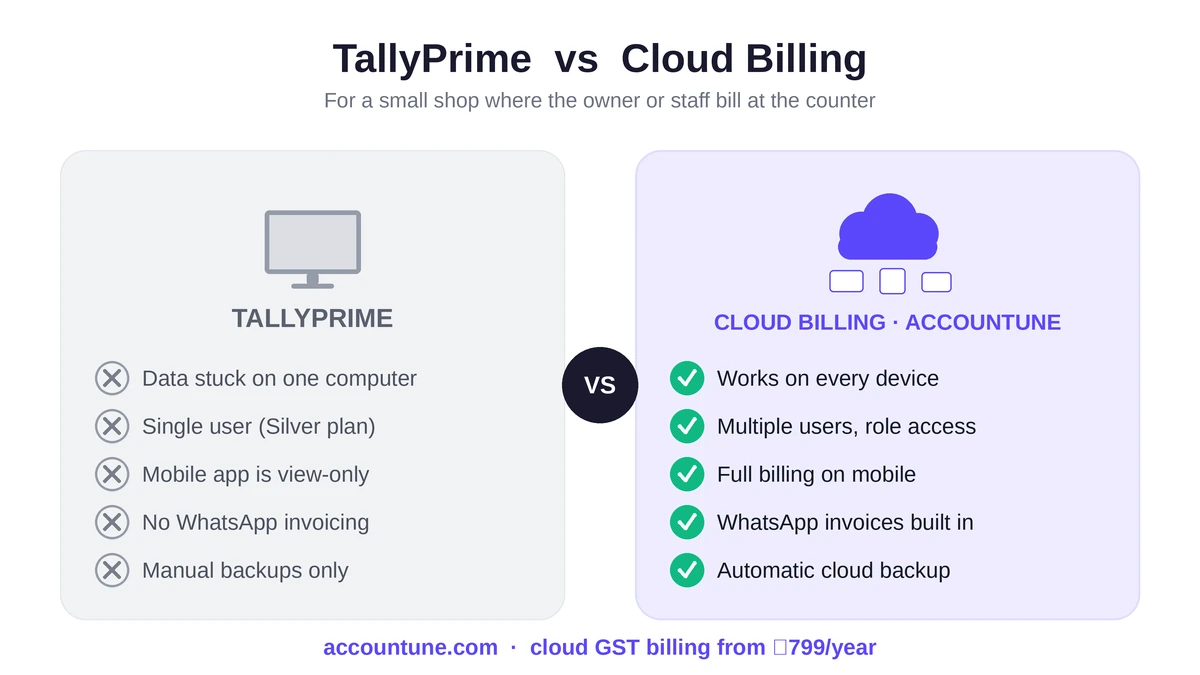
TallyPrime runs on a Windows PC. Your company data physically lives on that machine. This is the root limitation from which several others follow.
What it means day to day: you cannot check today's sales from home, your accountant cannot open the books from her own office without a remote setup, and if that one computer fails, your data is only as safe as your last manual backup. Businesses that want remote access buy third-party cloud hosting to put Tally on a server — which works, but adds cost and a moving part.
A cloud tool stores your data online instead. With Accountune, the owner can watch sales from a phone at home and staff can bill from a tablet at the counter, because the data isn't tied to one box. The honest trade-off: cloud software needs an internet connection, and Accountune has no offline desktop mode — so for a shop in a genuinely low-connectivity area, a desktop tool can be the safer architecture.
Limitation #2 — The mobile app is largely view-only
Most Indian shop owners run their business from a phone. They check stock between customers, glance at outstanding dues while travelling, and send bills over WhatsApp.
TallyPrime's mobile experience is built mainly for viewing reports, not for running the business. You cannot comfortably raise a full invoice, post vouchers or manage day-to-day billing from your phone the way you can on the desktop. For an owner who is often away from the shop, "read-only on mobile" is a real constraint.
Cloud billing tools are mobile-native by design. In Accountune, raising a GST invoice, recording a payment or checking stock works the same on an Android phone, an iPhone or a laptop — because there is one system, not a desktop app with a limited mobile companion.
Limitation #3 — Silver is single-user
TallyPrime Silver — the entry edition most small businesses buy — allows one user at a time. One person, one machine.
The moment a growing shop needs two people working simultaneously — the owner billing at one counter and staff at another during rush hour — Silver simply can't do it. The fix is TallyPrime Gold (unlimited users on a LAN), which is a large step up in price, not a small per-seat add-on. Many shops discover this only after they've outgrown Silver, mid-festival, when they least want a surprise cost. (We break the exact numbers down in our guide to TallyPrime's hidden costs.)
Cloud tools handle concurrent users more gently. Accountune's higher plans include multiple simultaneous users with role-based permissions — so billing staff can raise invoices without seeing the margins or financials you'd rather keep to yourself — at a fraction of a Gold-edition jump.
Limitation #4 — A steep learning curve
TallyPrime is keyboard-driven and assumes accounting literacy. For a trained operator, that makes data entry genuinely fast — but for a shop owner or a new billing assistant with no finance background, terms like ledgers, vouchers, and Dr/Cr are a wall. Staff usually need help or paid training before they're productive, and staff turnover means paying that cost again.
For a business that just wants fast, correct GST billing, the accounting depth becomes overhead rather than benefit. This is the single most common reason small-shop owners give for looking elsewhere: not that Tally can't do it, but that it takes too long to learn for what they actually need.
Cloud billing tools are built for the opposite user. Accountune needs no accounting knowledge — most owners raise their first invoice within an hour, and a new counter assistant can be billing the same day. The trade-off is honest: if you need deep, audit-grade accounting, a billing-first tool won't replace what a CA does inside Tally.
Limitation #5 — No built-in WhatsApp invoicing
In India, WhatsApp is the business channel. Customers expect their bill on WhatsApp; shops chase payments and send reminders there.
TallyPrime has no built-in WhatsApp invoicing. Sharing a bill on WhatsApp typically means exporting a PDF and sending it manually, or buying a third-party add-on. It's a small friction repeated dozens of times a day.
Accountune builds WhatsApp sharing in — generate a GST invoice and send it to the customer on WhatsApp in the same flow, no add-on. For a shop billing 30–50 customers a day, removing that repeated export step adds up.
Limitation #6 — GST compliance depends on paid TSS
This is the limitation with real compliance stakes. TallyPrime's licence is perpetual, but its GST and statutory updates arrive through TSS (Tally Software Services), an annual subscription. Let TSS lapse and your Tally becomes a frozen version — it keeps opening your data, but it stops receiving new GST rules, e-invoicing format changes and connected banking.
That matters more than usual right now. GST 2.0 changed the rate slabs to 0/5/18/40% in September 2025. A business running Tally without an active TSS risks billing on outdated rates — a genuine compliance problem, not a cosmetic one. So the "one-time licence" quietly carries an ongoing "stay-compliant" fee.
With a cloud tool, statutory updates are pushed automatically as part of the plan. Accountune updates GST rates centrally whenever the government changes them, so every shop is always billing on current rules — there's no separate subscription to keep the software legal.
Limitation #7 — No automatic cloud backup
Because TallyPrime data sits on a local machine, backup is your responsibility. If you don't take regular backups and the computer's disk fails — or the file corrupts — recovery can be painful, and recovering a corrupted company file is often a paid service.
Desktop software gives you control over your data, which some businesses prefer. But for an owner without an IT person, "remember to back up" is a real risk that quietly sits in the background.
Cloud tools back up continuously by design. Accountune stores data on India-hosted, encrypted servers with automatic backups, so a lost or broken device doesn't mean lost books — you log in from another device and carry on. (The flip side, again: this requires trusting cloud storage and having internet.)
Limitation #8 — Customisation needs paid TDL work
Need a custom invoice format, a specific report, or a tweak to how a workflow behaves? In TallyPrime, that's often done through TDL (Tally Definition Language) — which usually means hiring a Tally partner to develop the customisation. It's billable software development, and future changes mean going back to the developer.
TallyPrime's flexibility here is genuinely powerful for firms that need bespoke setups, but for a small shop that just wants its logo and terms on the bill, paying a developer is disproportionate. Cloud tools handle common customisation in settings: in Accountune, you add your logo, adjust invoice fields and apply templates yourself, without a developer.
TallyPrime vs cloud billing: side by side
Here is how the limitations map against a cloud alternative, for a small retail business.
Factor | TallyPrime | Accountune (cloud) |
|---|---|---|
Where data lives | One Windows computer | Cloud — every device |
Mobile billing | Largely view-only | Full billing on Android + iOS |
Multiple simultaneous users | Silver = 1; needs Gold | Included on higher plans, role-based |
Learning curve | Built for trained accountants | No accounting knowledge needed |
WhatsApp invoicing | Not built in | Built in |
GST updates | Need active paid TSS | Pushed automatically, in-plan |
Backup | Manual / your responsibility | Automatic, India-hosted |
Customisation | Often paid TDL development | Self-serve settings |
Offline use | Works offline (desktop) | Needs internet (cloud-only) |
Deep audit-grade accounting | Strong | Billing-first, lighter |
Entry price | Higher one-time + renewal | From ₹799/year, all-in |
Best fit / verdict | Accountant-led firms, complex accounting, offline needs | ✅ Best fit for small shops where the owner or staff bill at the counter |
Notice the pattern: TallyPrime's strengths cluster around deep accounting for a trained operator, while its limitations cluster around counter billing, mobility and simplicity — which is exactly what a small shop does all day.
Want to see the cloud side yourself? Read the best Tally alternative in India comparison, or try Accountune free — no credit card.
When TallyPrime is still the right choice
An honest limitations list has to say where Tally wins. Stay on TallyPrime if:
You have a dedicated accountant or finance person operating the software daily — its accounting depth and audit trail are genuinely hard to match, and a trained operator is fast in it.
You need complex, audit-grade financial reporting that a billing-first tool doesn't attempt.
You work largely offline in an area with unreliable internet, where a desktop-first design is the right fit.
Your CA works entirely inside Tally and prefers it — though note a CA can also pull GSTR reports from a cloud tool with read-only access.
For those businesses, TallyPrime's limitations for retail simply don't apply, and it remains an excellent choice.
Who should switch — and who shouldn't
A simple way to decide, based on the single question that matters most: who operates the software?
Switch to cloud billing if:
The owner or billing staff run the software, not a full-time accountant
You want to check the shop and bill from a phone
You have or expect more than one billing counter
WhatsApp invoicing and automatic GST updates would save you daily friction
You run a kirana, medical, hardware, electronics, garment, footwear or wholesale shop
Stay on TallyPrime if:
A CA or finance team operates it daily
You need deep, audit-grade accounting more than fast counter billing
You genuinely rely on offline operation
How switching actually works
The biggest reason shops stay put is fear of losing data. In practice, moving off Tally is straightforward:
Export customers, products and opening balances from Tally to Excel.
Import into your new tool's bulk-import — with Accountune, the support team assists during your trial, and most shops are operational within a day.
Run both in parallel for a few days if you want a safety net.
Your CA keeps working — she gets read-only access and pulls GSTR-1 and GSTR-3B reports directly.
Accountune includes free migration help with paid plans, so the switch doesn't cost you data or downtime. If cost is your main concern, our breakdown of TallyPrime's real hidden costs shows the five-year numbers side by side.
A shopkeeper's story
Composite example based on aggregated Accountune onboarding patterns; names and identifying details changed.
Meena runs an electronics and mobile shop. She'd used TallyPrime for years and had no complaint about its accounting — her problem was practical. She travels often to restock, and on the road all she could do in Tally was look at yesterday's numbers; she couldn't raise a bill or check live stock from her phone. During Diwali rush, her one Silver licence meant only one person could bill at a time, so a queue built up at the second counter.
She moved to a cloud tool on a multi-user plan. Now both counters bill at once, she raises invoices from her phone while travelling, and bills go to customers on WhatsApp directly. Her accountant still gets the same GSTR reports in the same format, so nothing changed on that side. Nothing dramatic — she just stopped being tied to one computer, and the shop kept moving whether she was there or not.
Try Accountune free — no credit card. Most owners raise their first invoice within an hour.
Final verdict
TallyPrime isn't bad software — it's software built for a different user. Its depth suits an accountant-led firm, but for a small shop where the owner or staff bill at the counter, its limitations are real: desktop-only data, a view-only mobile app, single-user Silver, a steep learning curve, no WhatsApp invoicing, and GST updates locked behind a paid subscription. That combination is exactly why so many Indian shop owners are moving to cloud billing. If that describes your shop, Accountune is a strong, affordable cloud alternative — from ₹799/year, mobile-first, with free migration help. If you have a full finance team and complex accounting, TallyPrime still earns its place.
Try Accountune free — no credit card needed.
Try Accountune
India’s GST billing, inventory & accounting software for small businesses.
Start free trialGet free demoFrequently Asked Questions
TallyPrime limitations
What are the main limitations of TallyPrime for small businesses?
The main limitations are that TallyPrime is desktop-only (data lives on one computer), its mobile app is largely view-only, Silver supports only one user at a time, it has a steep learning curve built for accountants, it has no built-in WhatsApp invoicing, and its GST updates depend on an active paid TSS subscription. These are fit issues for counter-billing shops, not signs of weak software.
Is TallyPrime cloud-based?
No. TallyPrime is desktop-first — the core application runs on a Windows computer. Cloud and remote access require third-party hosting on top. Tools like Accountune are cloud-native, so your data and billing work from any device.
Can I bill from my phone in TallyPrime?
Not comfortably. TallyPrime's mobile experience is mainly for viewing reports, not raising invoices or posting vouchers. If phone-based billing matters, a cloud tool such as Accountune supports full billing on Android and iOS.
Does TallyPrime support multiple users?
TallyPrime Silver allows one user at a time. Simultaneous multi-user access needs the Gold edition, which is a significant price step up rather than a small add-on.
Why does TallyPrime need a yearly subscription if the licence is lifetime?
The licence is perpetual, but GST and statutory updates come through TSS, an annual subscription. Without an active TSS, TallyPrime stops receiving new GST rules and connected services — so a GST-registered business effectively needs it.
Mobile, cloud and daily use
Does TallyPrime have WhatsApp invoicing?
No, it isn't built in — sharing a bill on WhatsApp usually means exporting a PDF manually or buying an add-on. Accountune includes WhatsApp invoice sharing in its billing flow.
Will my Tally data be safe on my computer?
Only as safe as your backups. TallyPrime data sits on a local machine, so backup is your responsibility and recovering a corrupted file can be a paid service. Cloud tools like Accountune back up automatically on encrypted servers.
Switching from Tally — best value
Which billing software is best for a small shop where the owner does the billing — TallyPrime or Accountune?
For a shop where the owner or staff do the billing, Accountune is the better fit — it's cloud-based, works on phones, needs no accounting knowledge, and starts at ₹799/year. TallyPrime remains the better choice for accountant-led firms that need deep, audit-grade accounting.
What is the cheapest cloud alternative to Tally for Indian small businesses?
Accountune is among the most affordable full-featured cloud options, starting at ₹799/year with a free trial, and includes GST billing, inventory, e-invoicing data and WhatsApp sharing — with no per-invoice fees. It's built for kirana, medical, hardware, electronics, garment and wholesale shops.
Can I move my data from Tally without losing anything?
Yes. You export customers, products and opening balances from Tally to Excel and import them into Accountune's bulk-import tool. Free migration help is included with paid plans, and most shops are running within a day.
Will my CA still work with me if I leave Tally?
Yes. Your accountant gets read-only access to Accountune and pulls GSTR-1 and GSTR-3B reports directly with their own login, so their workflow doesn't change.
Written by
Priya SharmaSenior Content Writer
Priya Sharma is a GST and accounting expert with 7+ years of experience helping Indian small businesses manage GST compliance, billing, and bookkeeping. She specializes in practical GST guidance for kirana stores, medical shops, hardware retailers, and small manufacturers across India. Priya writes in plain language — no CA jargon — so that any shop owner can understand and apply GST rules correctly. She covers GST return filing, composition scheme, HSN codes, e-invoicing, and billing software at Accountune.
Related posts
Best Billing Software in India 2026: 10 Compared on What Each Plan Actually Includes
Compared the 10 best billing software in India on price, GST features, free plans and devices. See which one fits your shop, and which to avoid.
Priya Sharma25 min readTally on Cloud Pricing India 2026: What You Will Actually Pay
Tally on Cloud pricing in India, and the two costs quoted prices leave out. Licence, TSS and hosting added up for 1, 3 and 10 users, against a cloud alternative.
Priya Sharma14 min readBest GST Accounting Software in India (2026) — Compared
We compared India's GST accounting software on the 2026 slabs, cloud access and fit by shop type, plus the test that separates a biller from real books.
Priya Sharma18 min read

Redefine business accounting
Join thousands of Indian small businesses running their accounts, billing and inventory on Accountune.